Network Assessment
NetBrain delivers a suite of automated network assessments that transform complex infrastructure analysis into proactive, continuous observability: Golden Assessments continuously check your hybrid network for industry-wide known outages; Post-Mortem Assessments dissect your past outages to find root causes and prevent recurrence across your network; and Quick Assessments provide on-demand health single item compliance checks across all relevant devices turning a single task into a bulk validation in minutes.Post Mortem Assessments
Find out what really caused the outage—and whether it’s hiding elsewhere.
When a network incident occurs, the priority is restoring service. But restoring service is not the same as understanding what went wrong. Without root cause analysis, the same misconfiguration that caused today’s outage will eventually cause another one.
NetBrain’s Post-Mortem Assessment automates the process of investigating failures and identifying similar risks across the network.
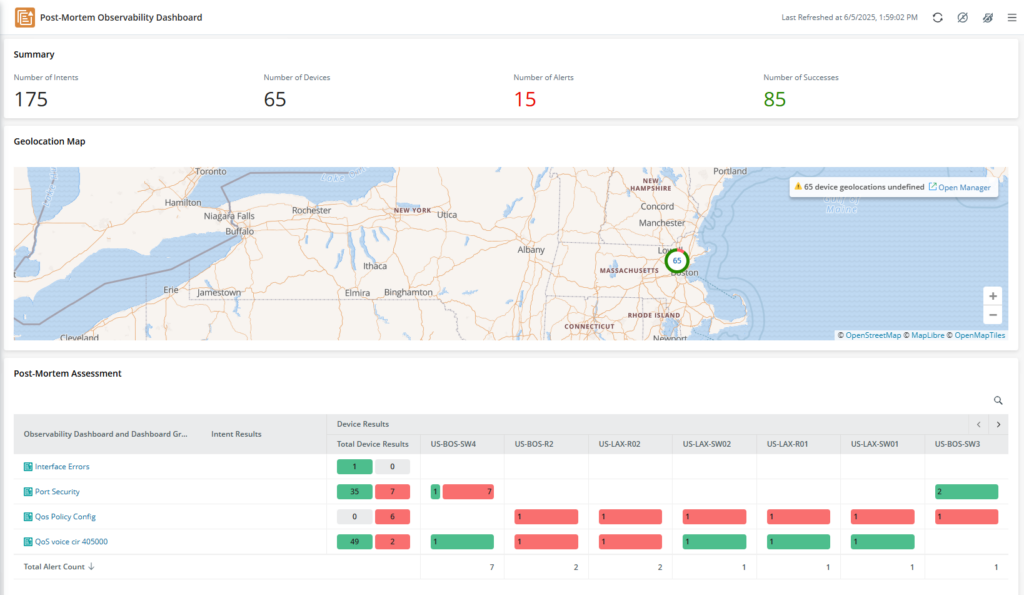
What It Does
Root cause analysis
After an incident, NetBrain captures the network state at the time of failure. It correlates configuration changes, routing updates, and interface data to identify exactly what triggered the outage—whether it’s a BGP flap, a saturated link, or a misapplied access list.
Network-wide risk scan
Once the root cause is known, NetBrain automatically scans the rest of the infrastructure for devices with the same configuration or condition. If a flawed route-map caused an outage in one data center, you’ll know before it causes one in another.
Incident timeline
NetBrain reconstructs the sequence of events showing how the failure propagated—what changed, when it changed, and which devices were affected at each stage.
Why It Matters
-
Prevent repeat outages by fixing the same problem everywhere it exists
-
Reduce troubleshooting time by automating the investigation process
-
Build institutional knowledge by capturing root cause analysis that can be reused
Post-mortem assessments turn every outage into a mechanism for making the network more reliable over time.
Quick Assessments
Assess any part of the network for any technology, rule, or policy, ad hoc, rapidly. Quick Assessment lets you check multiple network devices simultaneously. Create reusable assessment targets (a saved list of devices that you want to check regularly), run automated checks, and get consistent results—cutting assessment time and speeding up troubleshooting.
| The Old Way: Manual Checks | The New Way: Automated Assessments |
|---|---|
|
|
Assessment Targets: The Smart Device Template
An Assessment Target is a reusable, intelligent device template of devices that you want to check regularly. Build it once, then use it as a blueprint to run checks across the same set of devices repeatedly. Instead of picking the same devices over and over again every time you run a test, you create the list once and reuse it whenever you need it.
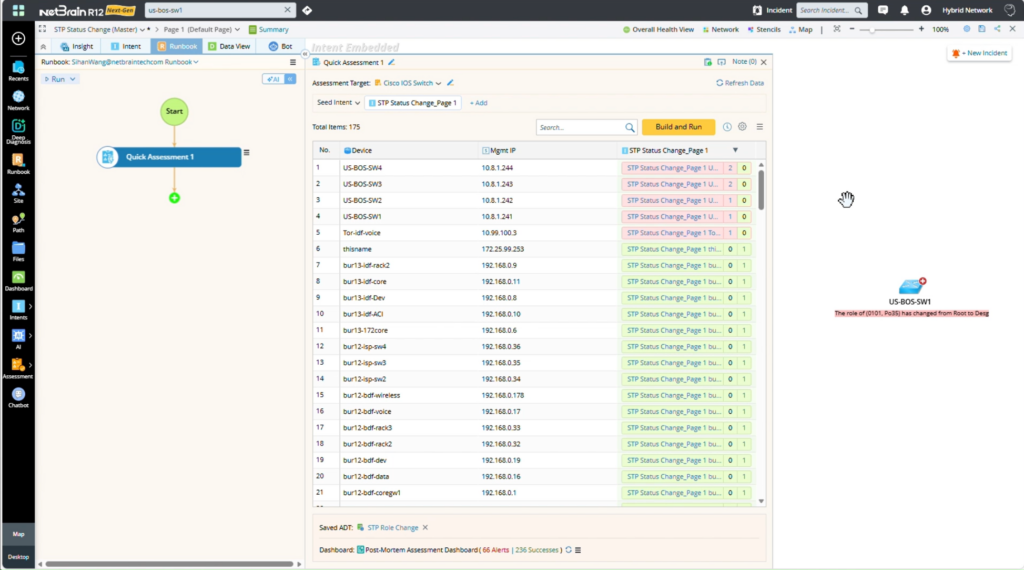
The Problem It Solves
- Manual Device Selection: Picking devices one by one for every check is slow and error-prone.
- Inconsistent Scope: Different engineers check different devices, leading to gaps and unreliable results.
- No Reusability: You can’t save your device lists, so you start from scratch every time.
Four Ways to Build Your Assessment Target
1. Map Devices: Use all devices on your current map. Perfect for checking everything in a specific network area you’re already looking at.
2. Network Change Devices: Auto-select devices affected by a recent change. Ideal for verifying that a network change worked correctly across all impacted devices.
3. Dynamic Scope: Start with base devices and automatically include their neighbors. Great for troubleshooting, ensuring you check not just the problem device, but everything connected to it.
4. Pre-Built Targets: Use a target you or your team already created. Save time by reusing proven, standardized device groups.
Why Targets Are a Game-Changer
- Save Setup Time: Pick your devices once. Use the same target for daily health checks, weekly compliance scans, or post-change verification.
- Ensure Consistency: Every engineer uses the same device list. No more missed devices or variation in what gets checked.
- Scale Effortlessly: A target built for 10 devices works the same way for 100 or 1,000. Your process doesn’t break as your network grows.
- Maintain Context: Targets remember why you grouped these devices whether it’s for an application, a location, or a specific function.
Real-World Example
Monthly Firewall Compliance Check
- Without Targets:
Manually list 50 firewalls → Run checks → Document results → Repeat next month. - With Targets:
Use the “Core-Firewalls” Assessment Target → Run checks → Done.
The same target is ready for next month, and the month after.
Common Scenarios
- Compliance Verification: Complete monthly compliance checks across 500+ devices in minutes instead of days.
- Change Impact Analysis: Instantly verify that network changes won’t break critical applications.
- Proactive Health Monitoring: Schedule daily automated checks that catch potential problems before users notice.
- Rapid Troubleshooting: Scan entire problem areas at once instead of checking devices individually.
Expected Results
Quick Assessment transforms network verification from a time-consuming chore into a fast, reliable, automated process.
| Before Quick Assessment | With Quick Assessment |
|---|---|
| Manual, repetitive work | Automated, efficient process |
| Hours or days per check | Minutes per check |
| Inconsistent results | Standardized outcomes |
| Missed issues | Comprehensive coverage |
| Hard-to-compare data | Clear, dashboard-ready results |
Continuous Golden Assessments
Continuously validate network intent, prevent configuration drift, and accelerate troubleshooting through automated assessments.